Building a Personal Second Brain with OpenClaw

I might have let this one get away from me a bit. I was seduced by the idea of a semi‑curated, semi‑agent‑managed dynamic knowledge repository, and it’s possible I not only wildly underestimated the complexity of such a tool, but I also missed that it’s going to be a loooong time before I even know whether it’s working or not. But if it does work, boy, is it gonna pay off. And it’s been a valuable learning experience to understand what is possible with the home-made skill-CLI combination.
Introduction: The “what do I use it for?” problem
Every OpenClaw user reaches a point where they ask: “What should I actually do with this thing?” You can automate emails, check calendars, summarise articles, and control smart home devices, which is all kind of funky - but that feels more like a robot assistant than a smart companion. How do you get to the next level? 🤔
My answer arrived via a 50‑day review of OpenClaw by Velvet Shark 💡. One of his ideas stood out: store everything in an Obsidian markdown vault and treat your OpenClaw agent as its curator. That felt like a blueprint for a system that was both human‑readable and machine‑searchable, transferable between platforms, and scalable over time.
This post walks through the genesis, design, and implementation of that personal second‑brain system. It’s a story of iterative vibe‑coding, hardware‑driven compromises, and the hope that the effort will eventually pay off when the system reaches scale.
Genesis: Velvet Shark’s knowledge management philosophy
Three principles from the article guided the entire project: 🧭
- Everything in markdown – completely transferable, no system dependence.
- Obsidian for human readability – visual exploration and linking between notes.
- Separate agent‑only memory from shared knowledge – a second brain distinct from the agent’s internal memory, with more structure and joint curation.
That last point is crucial. Agent memory (OpenClaw’s MEMORY.md) is totally unstructured, regularly compacted, and managed entirely by the agent. A second brain is a curated, 100% persistent, slightly structured knowledge base that you and your agent maintain together.
Design process: Staging areas and review workflows
As is often my way, I turned to ChatGPT to help flesh out the design. The conversation quickly took me down a path that was more developed than I’d originally intended. ChatGPT promoted the idea of a staging area and a review process - a workflow that would keep content well‑structured and easily searchable. 🤖
The resulting design splits the second‑brain vault into several folders: 📁
/Inbox– a staging area for new notes.- The “live” folders:
/Ideas– atomic knowledge notes./Projects– defined initiatives with outcomes and associated tasks./Task‑lists– lists of action items with status and timing./Interests– long‑term interest descriptions./Reference– summarised external material.
Notes move through a lifecycle: new → draft → active / canonical → archived. Only active or canonical notes are included in semantic searches. This staged workflow prevents the vault from becoming a noisy dumping ground and ensures that promoted content has been reviewed and structured properly.
Implementation: Skill, CLI, and the GitHub reality
The diagram
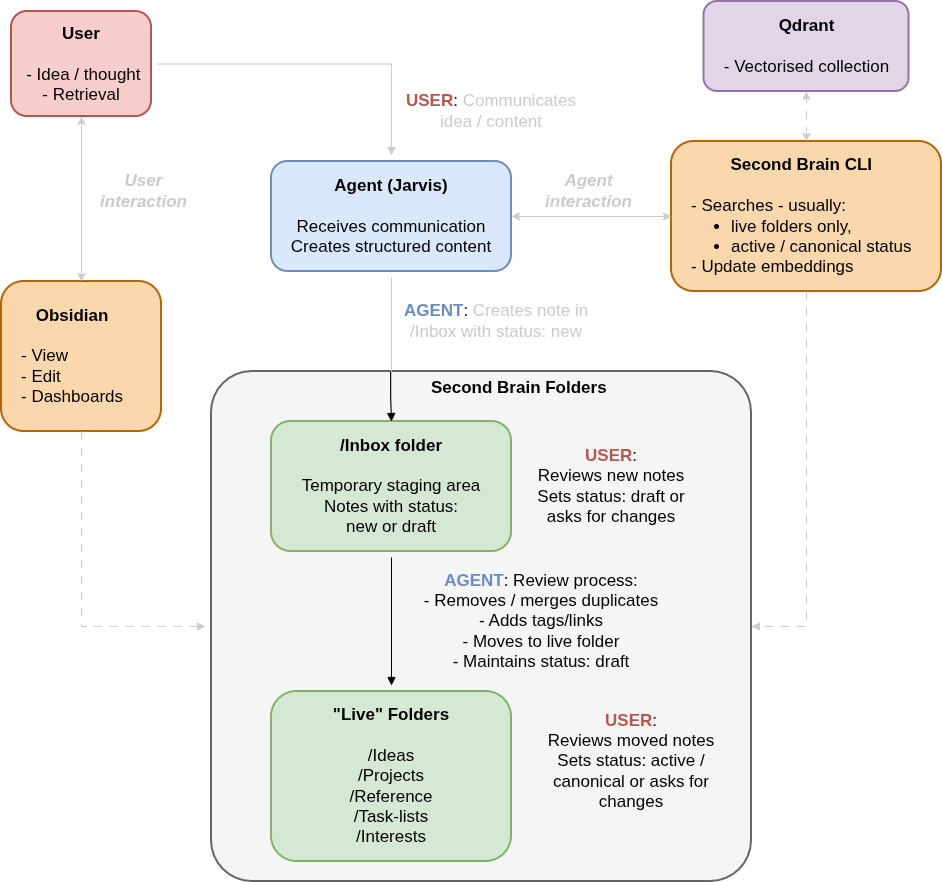
The diagram above shows the note lifecycle, the review process, and how the CLI integrates with the markdown vault. The rest of this section explains how we arrived at this final architecture - through skill creation, CLI development, and hardware‑driven compromises.
The skill
The core of the system is an OpenClaw skill I built with help from both ChatGPT and Jarvis (my own OpenClaw agent). The skill is relatively complex, dividing into an overarching skill and different pieces of guidance used depending on which function is currently being activated: ⚙️
- Creating new content – strict faithfulness to user input; only what the user explicitly said or implied.
- Reviewing inbox content – loading interest context, detecting duplicates, creating Obsidian links, promoting to live folders.
- Modifying live content – updating existing notes in live folders.
- Searching – semantic retrieval using a custom CLI (see below).
Each note type follows a template (Idea, Project, Task‑list, Interest, Reference) with YAML frontmatter and a consistent structure. Notes are atomic: one core idea per file. Obsidian‑style links ([[Note Title]]) connect related notes, building a graph over time.
The CLI and the Qdrant compromise
Velvet Shark used QMD for local semantic search. I tried that approach and immediately hit a wall: my OpenClaw host machine isn’t powerful enough to run QMD reliably. I’m guessing with a name like Velvet Shark he’s running his agent on a slick beast like a Mac Mini; whereas Jarvis has to make do with a modest VPS. 🐌
The solution was to move embeddings and vector‑database management off‑host to a third‑party provider: Qdrant. It’s a free‑tier cloud service that handles the vector operations my host can’t. To interact with it, I wrote a Python CLI tool (jarvisanwyl/second-brain-cli) that manages embeddings and searches.
The CLI was vibe‑coded with iterative design. The current repository contains functions that aren’t needed because the design evolved over time - I haven’t gone back to clean them up yet. That’s the GitHub reality: a working but slightly messy codebase that does the job.
Experience so far
The system works well at small scale. It captures spoken content accurately - I dictate ideas to Jarvis and they appear in the Inbox with minimal or no modification. The promotion workflow functions smoothly; moving notes from Inbox to live folders after review is straightforward. Search works well, too; but given the tiny number of notes in there I’d be seriously worried if it wasn’t finding stuff. 🎯
Next phase: Building volume and testing at scale
The biggest challenge is scale. I don’t yet have enough material in the vault to know whether the process truly holds up when there are hundreds or thousands of notes. I’m also still building the habit of adding things immediately; I’m currently too picky about what goes in, which slows growth.
If the system does work at scale, the payoff will be huge: a personal knowledge base that grows smarter over time, is completely under my control, and can be queried conversationally via my OpenClaw agent. ✅
The next step might be to automate nightly research - having Jarvis scour the web for interesting topics and automatically propose new ideas or projects without waiting for my prompt. That would accelerate the vault’s growth dramatically. The catch, of course, is that I’d need to decide what he should be looking for… and I’m not entirely sure what my interests actually are. (Maybe the second brain can figure that out for me.) 🔍
Whatever happens, this project has already taught me a great deal about what’s possible with OpenClaw skills in combination with custom CLI tools. Whether it becomes a cornerstone of my daily workflow or remains a promising experiment depends on the next few months of accumulation and iteration.
If you’re an OpenClaw user looking to build your own external memory system, feel free to adapt the skill and CLI. Just be prepared for some vibe‑coding, a few unused functions, and the occasional feeling that the thing might be getting away from you. 🚀